Turn Payments
into Powerful
Campaigns
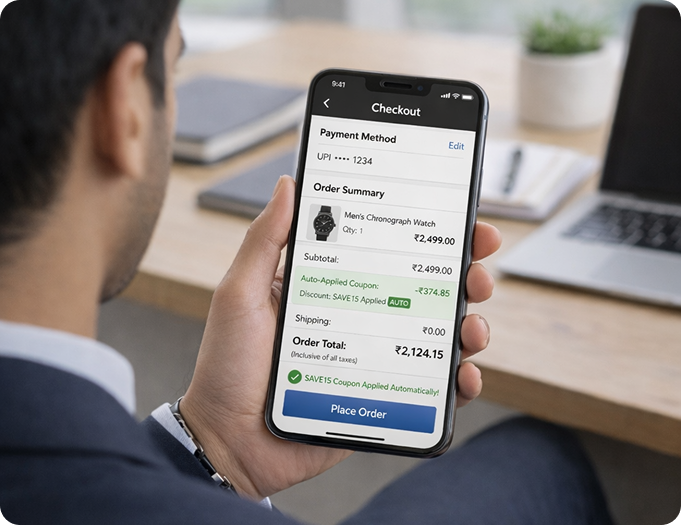
Create intelligent, auto-applied payment offers that boost
conversions, increase order value, and drive repeat purchases -
without coupons or technical complexity.
Who Can Use airpay offer wizard?

E-commerce & D2C brands
looking to improve checkout
conversions
E-commerce & D2C brands
looking to improve checkout
conversions

Marketplaces and
aggregators running bank
or card-led promotions
Marketplaces and
aggregators running bank
or card-led promotions

Omnichannel businesses
managing online and offline
payments
Omnichannel businesses
managing online and offline
payments

Subscription, services, and
high-ticket merchants driving
higher basket sizes
Subscription, services, and
high-ticket merchants driving
higher basket sizes

Ideal for businesses that want
campaign control directly from
their payments dashboard.
Ideal for businesses that want
campaign control directly from
their payments dashboard.
Why choose airpay offer wizard?

Auto-Applied Payment Offers
Eligible discounts reflect instantly at checkout— no codes, no confusion.

BIN & Card-Level Targeting
Launch issuer-specific or card-specific promotions with accuracy.

Flexible Campaign Controls
Define minimum transaction value, validity period, and offer logic with ease.

Live Campaign Dashboard
Monitor performance, redemptions, and impact in real time.


Integrated Reconciliation
Track offers alongside settlements for easier financial reporting.

Quick & Simple Setup
Create and manage campaigns directly from the merchant dashboard.

Customise as per your Brand
Personalise offer messaging, labels, and visibility to align with your brand communication.
How to Activate an Offer?
Log in to your
Merchant Portal
Access your dashboard
using your credentials.

Navigate to the
Offer Wizard Section
Go to the Campaign
Management section.

Enter Offer
Details
Add offer name, duration,
eligibility rules, etc.

Review and
Publish
Confirm the details and
activate the offer instantly.

Log in to your
Merchant Portal
Access your dashboard
using your credentials.
Navigate to the
Offer Wizard Section
Go to the Campaign
Management section.
Enter Offer
Details
Add offer name, duration,
eligibility rules, etc.
Review and
Publish
Confirm the details and
activate the offer instantly.
Frequently Asked Questions
Log in to your merchant portal, go to the Offer Wizard section, enter the offer details, customise it as per your brand, and make it accessible for your customers.
Offers are automatically applied at the checkout once the customer meets the defined eligibility criteria.
Yes. Campaigns can be configured using BIN (Bank Identification Number) and card-level rules, allowing you to run targeted promotions for specific card holders, issuing banks, or card types.
Yes. You have complete control to define minimum transaction values, campaign start and end dates, and other conditions based on your business objectives.
Yes. A real-time dashboard provides insights into campaign usage, redemptions, and overall performance, helping you measure impact and optimise future campaigns.
Yes. The platform is built to handle high transaction volumes, complex campaign rules, and enterprise-scale operations without performance or control limitations.
Yes. You can modify offer details, branding, or pause the campaign at any time, with changes reflecting in real time.


